1
UltraIDE Pro PCI User's Manual
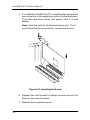
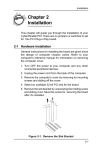
5. To install theUltraIDE Pro PCI, carefully align the board’s
bus connector to the expansion slot on the motherboard.
Push the card down firmly, but gently, until it is well
seated.
Note Hold the card by its external edges only. Try to
avoid touching the components, connectors or pins.
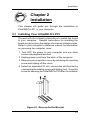
Figure 2-2: Installing the board
6. Replace the slot bracket's holding screw to secure the
board to the rear slot panel.
7. Replace the computer's cover.
2-2