1
LifeSize ClearSea User Guide
Audio Settings
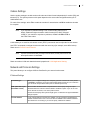
The audio settings allow you to configure devices for audio capture, playback, and ringing.
Microphone
Device
Select your audio capture device. While you talk normally, a green bar shows your voice
level in real time. If a clipped signal is detected, the input level is automatically adjusted to
avoid distortion.
Volume
Use the volume slider to adjust the output level of the selected device.
NOTE: If the echo canceller is enabled, the input level is automatically adjusted in real time
(also during the call).
Echo canceller
Enables the acoustic echo canceller to ensure top audio quality.
NOTE: The echo canceller removes the far end voice from your microphone input so that the
far end does not hear an echo of its audio. If you detect your local audio, ask the far end to
activate the echo canceller. When the echo canceller is active, the microphone level is
automatically changed in real time, according to estimated environment parameters.
Speakers
Device
Select the audio playback device to play in call audio.
Volume
Use the volume slider to adjust the output level of the selected device.
Test
Click to test the output volume.
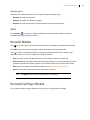
Ringing
Device
Select the audio ringing device to play the ringtone and other notifications.
Test
Click to test the output volume.
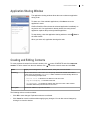
Video Settings
The video settings allow you to select and configure your video capture device.
Device
Allows you to select your video capture device. If the list is empty, ensure that
your device is connected and switched on and that the driver is installed. Ensure
that you are using the latest driver from the device manufacturer.
Open driver settings
Opens a new window that contains specific settings for your video capture
device. These settings are provided by the device driver and depend on the
manufacturer, model, and driver version. Some devices might not retain their
settings after a system reboot. Refer to the documentation included with your
device for more information.
15