1
LifeSize ClearSea User Guide
Codecs Settings
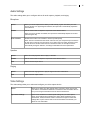
Use the codecs settings to enable each media codec and video format independently for receive (RX) and
transmit (TX). The options present on this panel depend on the server side configurations that your IT
Administrator sets.
For each of the settings, select TX to enable the encoder for transmission and RX to enable the decoder
for reception.
NOTE
If you experience problems during a call, such as audio-video errors or
delays, disable the higher resolution video formats (4CIF, QHD, 720p and
1080p). If you continue to experience problems, disable both RX and TX on
the H.264 video codec.
H.224 allows you to send far end camera control (FECC) commands used to adjust the far end camera.
Use FECC commands to navigate visual menus with the arrow keys (for example, some MCU series).
Read more in Far End Camera Control.
NOTE
LifeSize recommends that you keep H.224 enabled, as this protocol does not
affect performance or bandwidth.
Read more about H.239 and related advanced properties in H.239 Application Sharing.
Network and Protocols Settings
This panel allows you to configure LifeSize ClearSea for your network environment.
IP Network Settings
IP network type
Allows you to configure settings for IP telephony protocols. Choose one of the presets
or Custom to customize your receive and transmit speeds to best suit your connection
type. All values are specified in Kb/s (units of 1000 bits per second).
AIBC (Automatic Input
Bandwidth Control)
Allows LifeSize ClearSea Client to request that the remote party change its output
bandwidth based on real time network statistics. Enable this option if you use an errorprone network connection, such as the public Internet.
NOTE: Some third party video systems might ignore or otherwise not support bandwidth
change requests.
Local IP Address
If your network features more than one adapter, you can choose the IP address that
LifeSize ClearSea Client uses. Leave this value set to Auto unless LifeSize ClearSea
auto detection is not working or you want to specify a different IP address.
17