1
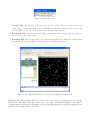
Hitting the go button sets the model in motion with rabbits moving randomly through the world and
eating, and rabbits and grass reproducing and dying. The arrows ( ) on the bottom right hand corner of
the go button indicate that this button toggles off and on. To stop or pause the simulation, simply click
on the go button again.
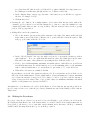
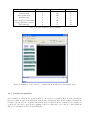
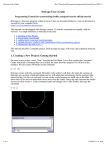
Stop or pause the simulation and right click on one of the rabbits in the world and select the inspect
rabbit option. This will bring up a window that displays the information on that rabbit agent. In the
example in Figure 3(a), we can tell we right clicked on “rabbit 619”. Each agent has its own identification
number, so it’s possible to send instructions to an individual agent. The information presented also gives
the rabbits (x, y)-coordinates in the world (which defaults to a two dimensional coordinate system with
−10 ≤ x ≤ 10 and −10 ≤ y ≤ 10). Values of any attributes (default or user-defined) are also presented in
this information. For instance, rabbit 619 has 7.285 units of energy associated with it at the instance we
paused the simulation.
(a) Inspecting An Agent
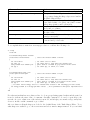
(b) Interacting through Command Center. Example: The Observer
asks a rabbit to change its color.
Figure 3: Inspecting and Communicating with Agents
The user, as “the observer”, can directly interact with the agents through the command window. For
example, with the simulation stopped, we can ask rabbit 619 to change it’s color by typing the appropriate
commands in the Command Center at the bottom of the NetLogo window. Figure 3(b) illustrates the result
of typing ask rabbit 619 [set color red].
The Procedures tab gives the collection of commands and procedures that define the rules for behavior
and attributes of each agent in relation to the buttons, sliders, graphs, etc. that are found on the Interface
tab. This is where the modeling takes place and it will be the focus of building your own predator-prey
model in the next section.
2
Building a Simple Predator-Prey Model
Let’s suppose we would like to model the Canadian lynx and snowshoe hare predator-prey dynamics with
NetLogo. Note we are making the simplifying assumption that the snowshoe hare is the only food source
for the Canadian lynx in keeping with the Lotka-Volterra predator-prey system dynamics. Before starting
our model, we must identify the “rules” that determine the behavior of the lynx and hares, outlined in
Table 1.