1
Battery
To change between toggle and momentary:
Hold the PUSH button and press the SELECT button. (Test the microphone
to confirm the change.)
Installation
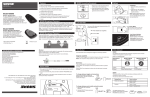
1. Open the battery compartment as shown.
Hold
2. Insert two 1.5 V "AA" batteries. Make sure the +/– terminals are properly oriented.
Note: Alkaline batteries last up to 8 hours. Rechargeable, carbonzinc, and zinc-chloride batteries provide less operating time.
To change between push-to-talk and push-to-mute:
1. Set the button for momentary operation.
2. Hold the SELECT button and press the PUSH button.
Hold
Power Meter
The battery meter on the LCD shows remaining battery life.
Mute Indicator
MX890
The desktop base illuminates the gooseneck microphone LED to indicate
whether the microphone is active or muted. Refer to the following table:
MX890 Status Indicator
Low Power Indicator
Steady Red: Power low. Replace batteries immediately
Pulsing Red: Batteries dead. Transmitter cannot be turned on until
batteries are replaced.
Microphone
Status
MX405 / MX410
Indicator
MX405R / MX410R Light
Ring
Active
Green
Red
Muted
Red/Flashing Green*
Off/Flashing*
*To toggle between off and flashing, press PUSH and ON/OFF simultaneously.
Mute Button
The mute button can be configured for toggle or momentary operation.
Toggle (as supplied)
The PUSH button toggles the microphone between active and muted states.
Note: The microphone always powers up in the active state.
Momentary
There are two types of momentary operation:
Push-to-Mute: The microphone is muted only while the button is pressed
and held.
Push-to-Talk: The microphone is active only while the button is pressed
and held.
United States, Canada, Latin
America, Caribbean:
Shure Incorporated
5800 West Touhy Avenue
Niles, IL 60714-4608 USA
Phone: 847-600-2000
Fax: 847-600-1212 (USA)
Fax: 847-600-6446
Email: info@shure.com
www.shure.com
©2013 Shure Incorporated
MX690
The bi-color LED on the top of the microphone indicates whether the microphone is active or muted.
The LED can also be set to flash when muted.
MX690 Status Indicator
Display Mode
Status Indicator
Steady (as supplied)
Active = Green
Muted = Red
Flashing
Active = Green
Muted = Flashing Green
Europe, Middle East, Africa:
Shure Europe GmbH
Jakob-Dieffenbacher-Str. 12,
75031 Eppingen, Germany
Phone: 49-7262-92490
Fax: 49-7262-9249114
Email: info@shure.de
Asia, Pacific:
Shure Asia Limited
22/F, 625 King’s Road
North Point, Island East
Hong Kong
Phone: 852-2893-4290
Fax: 852-2893-4055
Email: info@shure.com.hk