1
30
Software
5.2
The monitor program (only Microsoft Windows)
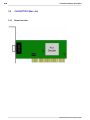
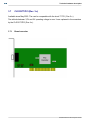
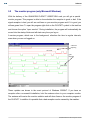
With the delivery of the QUANCOM CLOCK77 USB/PCI/ISA card you will get a special
monitor program. This program is able to show whether the reception is good or bad. If the
signal reception is bad, you will see red lines on your monitor program and if it is good, you
will see green lines. To open the program right click on the CLOCK77 symbol in the task bar
and choose the option ”open monitor”. During installation, the program will automatically be
moved into the startup folder and will start every time you log on.
A service program, which runs in the background, refreshes the time in regular intervals,
even when you are not logged on.
schlechter
Empfang
rote Linie
guter
Empfang
grüne Linie
These updates are shown in the event protocol of Windows 2000/NT. If you have no
reception after a successful installation, hold the antenna close to your computer monitor.
The antenna will receive the monitor radiation and will show lines on the monitor program of
the CLOCK77. In addition it is possible that a bad reception can be caused by the weather.
© QUANCOM Informationssysteme GmbH