1
Caller ID
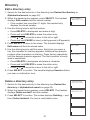
Dial a caller ID log entry
1. When in the caller ID log (see Review the caller ID log on page 24), press
to browse to the desired entry.
2. Press
to dial.
or
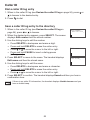
Save a caller ID log entry to the directory
1. When in the caller ID log (see Review the caller ID log on
Edit number
800-595-9511_
page 24), press or to browse.
2. When the desired entry appears, press SELECT. The screen
displays Edit number and the stored number.
3. Use the dialing keys to edit the number.
• Press DELETE to backspace and erase a digit.
• Press and hold DELETE to erase the entire entry.
Edit name
• Press or to move the cursor to the left or right.
• Press and hold PAUSE to insert a dialing pause
(a P appears).
4. Press SELECT to move to the name. The handset displays
Mike Smith_
Edit name and then the stored name.
5. Use the dialing keys to edit the name.
• Press DELETE to backspace and erase a character.
• Press and hold DELETE to erase the entire entry.
• Press or to move the cursor to the left or right.
6. Press SELECT to confirm. The handset displays Saved and then you hear a
confirmation tone.
• If there is no caller ID information, the handset displays Unable to save and you
hear a double beep.
25