1
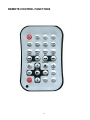
POWER
Power On/Standby selection
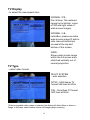
NTSC/PAL
Select NTSC, PAL or Multi-system format.
MUSIC S.SHOW
Display images during MP3 playback (set in STOP mode)
SLIDE SHOW Display JPEG images, 13 kinds including “None” & “Random”
AUDIO
Select Audio channel; generally Channel 80 for VOB type file; if not,
press Audio to switch
TARGET
Select a folder or files in the CF Card as target to copy to 2.5” HDD.
ZOOM
Zoom ON / OFF
DISPLAY
for MPEG: chapter elapsed time ON / OFF
in File List: DELETE, RENAME, PROPERTIES, CANCEL
CLEAR
Erase typos when key in new folder’s or file’s name using DISPLAY
THUMBNAIL Activate thumbnail mode
REPEAT
Select Repeat mode:
DISC -play once all files on disc
DISC REPEAT -play & repeat all files on disc (default)
SINGLE -play one single file, still frame jpegs chg w >>| and |<<
FOLDER -play once a single folder
REP-ONE -play & repeat single file only
FOLDER REPEAT -play & repeat a folder
VOL +
Volume Increase
VOL -
Volume Decrease
MUTE
Turn volume on or off
é
Move UP
ç
Move LEFT
è
Move RIGHT
ê
Move DOWN
ENTER
Confirm selection
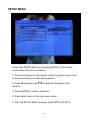
SETUP
Access System SETUP MENU
||
PAUSE
>
PLAY
STOP/QUIT n Stop displaying or playing file
GOTO
Switch between CF card & HDD
REV <<
Fast Rewind
FWD >>
Fast Forward
PREV |<<
Back to previous multimedia file
NEXT >>|
Go to next multimedia file
7