1
BASIC OPERATION
Charging
Before using your iVUE, it is recommended that you fully
charge it using the supplied charging cable. For peak
performance, charge the battery for a full 3-4 hours. Please do not charge longer than 12 hours.
• You can charge the glasses with the included AC Adapter
or through a computers USB port.
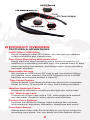
• Charging indicator light is located directly above the mini
usb charging port.
• Computer: Red/yellow light illuminates while charging.
Green light when fully charged.
• Wall Outlet: Red light while charging. No lights illuminated
when fully charged.
• Make sure glasses are turned off while charging
• For best results, only use the provided charging cable.
• If unused for long periods of time, make sure to charge
your iVUE fully before using it again.
Recording
• The record button is located on the right temple.
• Press and hold the button until you hear the glasses beep
four times, to alert that recording has started.
• While recording, the recording indicator light will flash blue.
• To stop recording, push and hold the button until you hear
a long beep.
• Each time you start/stop recording a new video file is
created. NOTE: to limit video size, the glasses will
automatically save a video file every 25 minutes.
• NOTE: Make sure SD card is inserted before recording.
Auto Shutoff
If the battery is low or there is no free memory, the device
will save the current file and beep as it powers down.
Reset
There is a reset button located directly above the USB port
of the glasses. Use a tip of a pen (or other fine tip object) to
press the button in fully. This will reset your iVUE’s back to
the manufacturer default. Also, if the glasses malfunction
or are no longer recognized by a computer, try resetting.
SETUP
Turn On/Off The Time/Date Display
1. Connect your iVUE’s to the computer while turned off (With
SD Card Inserted). 2. Open “Setting.txt” from the root folder of the glasses.
3. First change “UPDATE:N” to “UPDATE:Y” then refer to line
item “RTCDisplay”. Set to “0” to turn off time stamp or set
to “1” to turn on time stamp.
Setting Current Time/Date
1. Connect your iVUE’s to the computer while turned off (with
SD Card inserted).
3