1
h)
Experimenting with Urgent Cast
Urgent Cast is a unique feature built in to the Web Content Manager that allows
administrators of the iTech Systems to broadcast urgent messages throughout all or selected
panels at the same time.
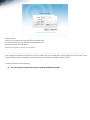
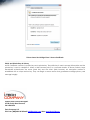
You can access the Urgent Cast feature by clicking on the Urgent Cast link under the Systems
menu.
•
•
•
•
•
•
•
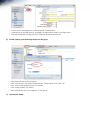
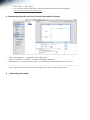
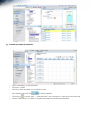
Click “Scheduling” on the left panel
Start by selecting a group that you wish to broadcast the same message to (You can also
click on “Group” instead of any individual grouping if you wish to broadcast to all players).
Type your urgent message under the “Text” field. You can also cut and paste onto that section.
Type in duration in seconds.
You can also change the speed, position, font and background color at this point if you wish.
Select a background audio or select some multimedia content at this point if you wish.
Click on preview to have this displayed on your pre selected media player. Once you are
satisfied with the result, click on “Publish” to make this urgent broadcast message effective
immediately.
3. When we reached the scheduled date/time, the player will start downloading and playing the
content automatically. The download may take a while depending on your uploaded media size
and playlist.
4. Security and Network Consideration
The Content Manager software hosted through DT Research currently utilizes the VeriSign Class 3
Secure server SSL Certificate, as such your login authentication information is securely transmitted
over the Internet to a server hosted by DT Research.