1
�
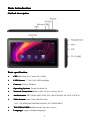
Ports: micro USB*1 , Earphone * 1, TF card slot * 1,DC IN*1,MIC*1
�
Buttons: Power/Vol+/Vol-
Quick Start
Battery management and charging
Before using this device, please charge it fully. Put the charger adapter into the DC
jack, the device will start to charge.
TIPS
【TIPS
TIPS】::
�
This device adopts built-in polymer battery. Only the specified charger should be
used.
when it is charging, the icon of battery will be rolling.
when the charging finish, the battery icon will turn blue and stop rolling.
�
If you do not use this device for a long time, please charge/release it once one
month to avoid deep discharge.
�
When it is power off because of low battery, connect to the charger, the device
will indicate “low power” or “charging”, please wait for a second until the machine can
turn to the main interface once the power is enough.
�
The built-in polymer battery should be charged regularly. The damage caused by
battery over-consuming is not included in the warranty.
Boot and Shutdown
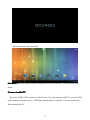
Boot: Press and hold the power button, the system will enter the boot process
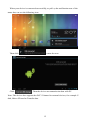
System has been started, entering the Android system:
2