1
OPERATING INSTRUCTIONS:
1.GENERAL DESCRIPTIONS:
a. There are 192 channel outputs selectable in every scene. Every channel may have
a value between 0 and 255.
b. Each bank may contain 8 different scenes. When playback of scenes is activated,
the scenes in a bank will run in a continuous cycle.
c. Select the desired bank using the UP and DOWN buttons. You may also select the
desired bank using MIDI signals through the built-in MIDI interface There are 30
banks for scene storage, it is not possible to select several banks at once.
d. Scenes can be executed automatically, and the duration depends on the desired
speed, selectable with the SPEED fader and TAP SYNC button. Scenes are
executed under music triggering or NOTE triggering. Scenes can be triggered
manually by using the SCENE buttons in every bank.
e. There are 6 chases which can be programmed freely. Each may contain 240 scenes.
2.
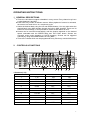
CONTROLS & FUNCTIONS
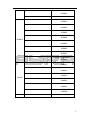
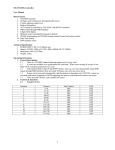
1.Scanners(1-12)
Scanners
Channel
Fade control
1
1-16
2
17-32
OFF
OFF
3
33-48
OFF
OFF
4
49-64
OFF
OFF
5
65-80
OFF
OFF
6
81-96
OFF
OFF
7
97-112
OFF
OFF
8
113-128
OFF
OFF
9
129-144
OFF
OFF
10
145-160
OFF
OFF
11
10-176
OFF
OFF
12
177-192
OFF
OFF
OFF
LED
OFF
3