1
English
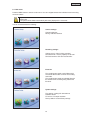
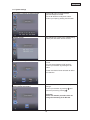
6.6 System settings
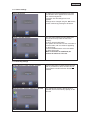
Time setting = settings for date and time
Press the ► button to toggle between
year/month/day/hour/minute.
Use the ▲▼ buttons to adjust the values.
Confirm your input by pressing the OK button.
Software version
This indicates the version of the software being
used by the door station and the monitor.
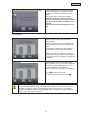
TV-format = TV output resolution
Use the ◄► buttons to select the preferred TV
format.
You can choose between NTSC and PAL.
Confirm your selection by pressing the OK
button.
Please note that the format selected can affect
the resolution.
Set to factory default =
Restore default parameters
Press the OK button to launch the factory
settings.
Confirm your selection by pressing
, and
cancel the process by pressing
.
Important:
Please note that this procedure does not
change the formatting of the SD card.
18