1
MOVIE DISC ENTERTAINMENT
....................
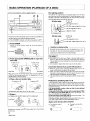
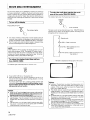
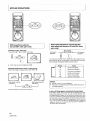
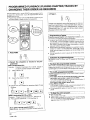
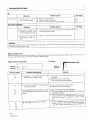
The on-screen display can be defeated to enhance the ambience
of movie entertainment. In addition, the Quick-Turn function which
allows to reduce the time required before starting playback or
changing disc side and the Theater Bass function which allows to
select the audio matching the ambience of each movie are also
provided.
DISPLAY
The indicator lights when the theater bass function
O
OFF.
DISPLAY
OFF
Press repeatedly
O
a
The indicator
lights.
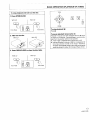
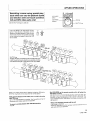
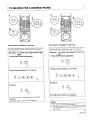
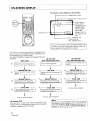
The bass sound can be enhanced every time THEATER BASS is
pressed. Set the button to the desired position according to the
atmosphere of the movie you watch.
The display window as well as the on-screen display turns off.
However, when a button on the player or remote control unit is
pressed, the operation mode is displayed for about ! .5 seconds.
The TV screen color while the disc is turned or stopped changes from a blue background to a black background.
•
is on.
THEATER
BASS
1
To turn off the display
Press
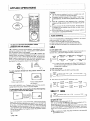
To select the audio that matches the ambience of the movie (THEATER BASS)
Off : Original audio
Once
LEVEL-l: Bass is enhanced
Twice LEVEL-2: Bass is enhanced
more
NO TE:
When DISPLAY OFF is pressed, the display window turns off
even while the power is ON. The display OFF state is held in
memory even after the power is switched off so the display
window is off when the power is switched on later. To turn on
the display window, press DISPLAY OFF again.
_[
Three times
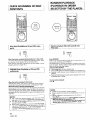
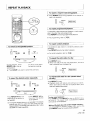
To reduce the playback start time and turn
time (QUICK-TURN)
The indicator lights when the quick-turn function
than LEVEL-1
LEVEL-3: Bass is enhanced
than LEVEL-2
more
The level is displayed on the top right of the screen.
is on.
BASS
__J
LEVEL-1
QUICK
TURN
O
Press QUICK TURN to turn this function off.
When the quick-turn is on, the TOC recorded on the disc is not
read so the time required before starting playback or turning
the disc can be reduced.
As a result, even when the LD being played contains TOC
information, the random playback, total time display, remaining time display and the elapsed time display of CAV (standard play) disc will not function.
NOTES
•
•
•
:
When the AC cord is plu_l_led into a power outlet and the
power of the player is switched on, the quick-turn is automatically turned on and the indicator lights.
The quick-turn is turned off automatically when a CD is inside the player. If an LD is placed in it, the previous state is
recalled from the memory and the quick-turn is turned on
again.
The quick-turn on or off state is held in memory even after
the power is switched
off so the same state is recalled
when the power is switched on later.
_NoTES:
a Turning on Theater Bass may distort the dialog portion of a
sound track when used with certain discs or system configurations. If this occurs, either turn down the Theater Bass
level or turn Theater Bass off.
•
The theater bass is turned off automatically
when a CD
inside the player. If an LD placed in it, the previous state is
recalled prom the memory and the theater bass is turned on
again.
• The theater bass on or off state is held in memory even after
the power is switched
off so the same state is recalled
when the power is switched on later.
• The Theater Bass function is switched off automatically when
the microphone is plugged in. The Theater Bass is switched
back to on as soon as the microphone is unplugged.
• The Theater Bass function is switched off automatically when
One-Touch
Karaoke is switched on. In this case, return
to the Theater Bass does not occur.
14
<VRB 1148>