1
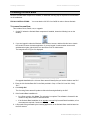
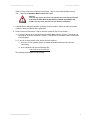
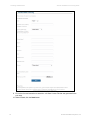
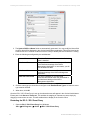
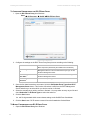
Ocularis Installation & Licensing Guide Installing the Ocularis Event Proxies 10. The next screen, Ready to Install the Program, will confirm the file path and disk space requirements. Click Next if OK or click Back to make changes to the directory path or the folder. 11. After clicking Next, the RC-C / RC-I Event Proxy software is installed. 12. When the installation is complete, the Setup Wizard Complete for RC-C / RC-I Event Proxy appears. Click Finish. The RC-C / RC-I Event Proxy is installed. The installation of RC-C / RC-I Event Proxy will create the following icon on the desktop: Configuring the RC-C / RC-I Event Proxy Ocularis CS and Ocularis IS recorder events, set up in each corresponding Management Application, , are sent to Ocularis Base via the NetCentral port. Configuring the RC-C / RC-I Event Proxy includes configuring NetCentral settings in the corresponding Management Application and configuring settings within the RC-C / RC-I Event Proxy screen. Two steps are involved: Configure Events in the Management Application for RC-C or RC-I Configure Parameters in the RC-C / RC-I Event Proxy Configure Events in the Management Application for RC-C or RC-I 1. On the NVR Server, open the Management Application. 2. Expand the Advanced Configuration branch. 3. Right-click the NetCentral node and select Properties. 4. In the NetCentral settings, check the Enable NetCentral connections checkbox. 5. Fill in the following: Login name Enter a valid login name found in the NVR. You may use the admin account if you want. Password Enter the password for the login account entered above. Port This is the port that will be used to communicate events between the NVR and the RC-C / RC-I Event Proxy. You may keep the default of 1237 in most cases. Table 1 NetCentral Settings 6. When done, click OK to close the NetCentral Settings pop-up. 7. Exit to the Management Application, Save changes and restart services. Configure Parameters in the RC-C / RC-I Event Proxy 1. Open the RC-C / RC-I Event Proxy from Windows: Start All Programs OnSSI RC-C / RC-I Event Proxy On-Net Surveillance Systems, Inc. 19