1
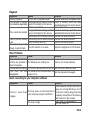
Shooting
Symptom
Cause
The battery is running low.
The power is not on.
The camera is not in shooting mode.
The shutter button is not pressed all
the way down.
The memory card does not have any
Even if I press the shutter free capacity.
button, the camera does End of memory card life.
The flash is charging.
not shoot.
The memory card is unrecognized by
the camera.
The auto power off function is activated.
The memory card is write-protected.
The power is not on.
Images do not appear on
LCD monitor is dark.
the LCD monitor.
Although it is set to auto The lens is dirty.
The distance to the subject is smaller
focus, it does not focus.
than the effective range.
The flash does not fire.
The flash is set to flash off.
The flash cannot recharge.
Even though the flash fired, The distance to the subject is greater
the image is dark.
than flash effective range.
The image is captured in a dark place
while set to flash off.
The image is dark.
It is under-exposed.
The image is too bright.
It is over-exposed.
The image lacks natural color. The image was captured in conditions that
are hard for auto white balance to adjust to.
EN-62
Solution
Recharge the battery.
Turn the power on.
Slide the mode switch to shooting mode.
Press the shutter button all the
way down.
Insert a new memory card, or
delete unwanted files.
Insert a new memory card.
Wait until the status LED off.
Format the memory card in this
camera before its first use or when
it was used other than this camera.
Turn the power on again.
Remove the write-protection.
Turn the power on.
Adjust the brightness of the LCD
monitor in the menu.
Wipe clean with a soft, dry cloth
or lens paper.
Get your subject within the
effective focus range.
Set the flash to something other
than flash off mode.
Get closer to your subject and
shoot.
Set the flash to something other
than flash off mode.
Set the exposure compensation
to a larger value.
Set the exposure compensation
to a smaller value.
Add a white object to the
composition.