1
8
This chapter shows you how to delete contents on
Sansa® Clip player.
Deleting Music Files
There are 2 ways to delete music files. You can delete them from the player directly or
using the computer.
®
To delete music files directly from the Sansa player, follow these steps:
1. In playback mode, press Submenu button.
2. Select the Delete Song item.
To delete music files using the computer, follow these steps:
®
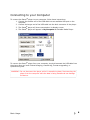
1. Connect your Sansa to the computer.
2. Select Open device to view files using Windows Explorer on initial
connection.
3. Locate the folder where your music files are stored.
4. Highlight and delete the music files or folder.
Deleting Music Files
17