1
18
SPECIAL FUNCTIONS DESCRIPTION
____________________________________________________________________________________________________________________
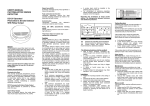
12. Density determination (hYdro)
0g
MENU
F.. -hYd
T
F.. -1
T
0g
This function calculates material
density basing on its weight in air
and in liquid of known density using
the formula below:
ρ=
m1
m1 − m2
* ρL
where, m1 – weigh in air
m2 – weight in water
ρL – density of liquid
Default liquid density is:
ρL = 1g/cm3
100g
(distilled water).
When using liquid other than
distilled water, choose F..- hYd and
use F..-2 option to enter its density
according to its temperature.
51g
1g
0g
F.. -hYd
F.. -P
1
MENU
T
T
n
-- 2,0000
0g
To enter the value use the following
keys:
→0← - digit increase,
- decimal point,
→T← - next digit,
MENU - end.
The measurement is performed in
three phases:
-measurement in air,
-measurement in liquid,
-hanger weighing.
To read density determination result,
enter F..-hYd function menu and use
F..-P
option. Press
key to
display successive measurement
number. Press
key again to
display density measurement result
and to send the density value to the
printer. The balance is now ready for
the next density determination.