1
Terminal
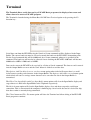
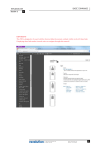
The Terminal allows serial data sent by a PICAXE Basic program to be displayed on-screen and
allows data to be sent to a PICAXE program.
The Terminal is launched using the Menu Bar, PICAXE then Terminal option or by pressing the F8
function key -
Serial data sent from the PICAXE using the Sertxd or Serout commands will be displayed in the Input
Buffer. The correct baud rate must be selected to match the baud rate the PICAXE is transmitting with.
For the Sertxd command this will be 4800 baud, for a Serout command, whatever is specified in the
command. The baud rate will need to be adjusted if over-clocking the PICAXE; 4800 baud will become
9600 baud at 8MHz, 19200 baud at 16MHz.
Data can be sent to the PICAXE to be received by a Serin or Serrxd command. The data to send is entered
into the Output Buffer text area and the 'Send' button is clicked to send the data.
The Options, Add 5ms delay between sent bytes menu option when ticked will ensure there is a small
delay between sending each character in the Output Buffer. The Options, Add <CR> on send menu option
when ticked will cause a carriage-return character to be sent after the data in the Output Buffer is
transmitted.
The Edit, Clear Input Buffer and Copy Input Buffer menu options will clear the Input Buffer display and
copy whatever is held in the Input Buffer to the Clipboard respectively.
The Refresh menu option will clear the Input Buffer display, close and then re-open the serial input
connection. This is convenient if the computer is buffering up a lot of serial data and it is desired to skip
that data to what is currently being transmitted.
The 'Close' button and File, Exit menu option will close the Terminal and allow editing of the PICAXE
Basic program to continue.
22 of 29