1
DVI-D CAT X KVM-EXTENDER
3.2 Interconnection Cable Requirements
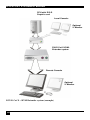
To connect the Local and Remote units you will need:
•
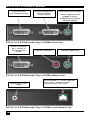
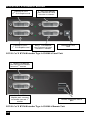
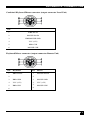
DVI, PS2-Keyboard, PS2-Mouse: Connect the supplied KVM CPU cable set to your
CPU (KVM.- Switch, etc.). Please ensure that the connection is tension-free! Devices
ACS1009A + ACS2209A
•
DVI, USB-Keyboard, USB-Mouse: Connect the supplied KVM CPU cable set to your
CPU (KVM.- Switch, etc.). Please ensure that the connection is tension-free! Devices
ACS4001A + ACS4201A
•
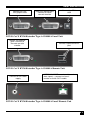
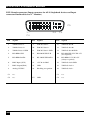
DVI: Connect the supplied DVI CPU cable set to your CPU (KVM.- Switch, etc.).
Please ensure that the connection is tension-free! Devices ACS2209A + ACS4201A
•
CATx Cable: Recommended cable: S/UTP (CatX) according EIA/TIA 56A, TSB 36 or
Digital STP 17-03170. Four pairs AWG 24. connection according EIA/TIA 568A
(10BaseT). Use of cables from a higher category (Cat5e, Cat6, Cat7) is possible.
The use of unshielded CATx Cable is possible, because of the higher electromagnetic
noise/sensitivity the device class may not be reached.
The use of flexible Cables (Patch cable) Type AWG26/8 is possible. Because of the
higher loss of the stranded cables, the maximum distance is reduced to approx. half the
value of solid cables.
A point to point connection is required. Having one or more patch panels
in the line is possible and allowed. Not allowed is a connection from the
CATx link interface (RJ45) to any other products, especially
telecommunications or network equipment.
•
Power Supply
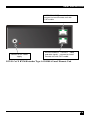
Connect the supplied 5V/DC power supplies to the Plug terminal on the rear of both
Local and Remote units.
16