1
WWW.FOSCAM.COM
FI8918E User Manual
4 APPENDIX
4.1 Frequently Asked Questions
NOTE: Always verify network connections are working by checking the status of the indicators
on the network server, hub, exchange and network card.
4.1.1 I have forgotten the administrator username and/or password
To reset the administrator username and password, press and hold down the RESET BUTTON
for 15 seconds. Releasing the reset button will restore the factory default settings for username
and password. You must power on the camera before reset.
Default administrator username: admin
Default administrator password: No password
4.1.2 Subnet doesn’t match, dbclick to change
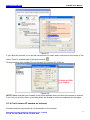
If IP Camera Tool shows the error “Subnet doesn’t match, dbclick to change!”, select Obtain IP
from DHCP server. (Figure 2.4)
If this error still exists after obtain IP from DHCP server, check your local area connection of your
computer and verify the subnet and gateway of the camera which should be the same subnet of
your computer. (Figure 2.5)
4.1.3 No Pictures Problems
The video streaming is transmitted by the ActiveX controller. If ActiveX controller isn’t installed
correctly you will see no video image. There are two ways to resolve this problem:
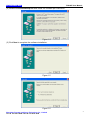
1) Re-install “IP Camera Tool” and activeX control(recommended) (Figure 2.10~Figure 2.12)
2) Download ActiveX controller and set the security setting of IE: IE browserÆToolÆInternet
ProperÆSecurityÆCustom LevelÆActiveX control and Plug-ins. The first three options should
be set to be “Enable”, The ActiveX programs read by the computer will be stored. As follows:
Enable: Download unsigned ActiveX controls
Enable: Initialize and script ActiveX controls not marked as safe
Enable: Run ActiveX controls and plug-ins
Shenzhen Foscam Intelligent Technology Co., Limited
Tel: 86 755 2674 5668 Fax: 86 755 2674 5168
40