1
1. New SUPREMA Biometic Reader Support
Two new Suprema Biometric Readers have been integrated into the Amadeus 5 system:
•
BioLiteNet - Finger/Card/Keypad/Display
•
BioEntryPlus – Finger/Card
EM Marine and Mifare cards are supported, following to
the reader type:
Reader Type EM Marine
Mifare
BioEntry Plus BEP
BEPM-OC
BLR-OC
BLN-OC
BioLite Net
As the other DDS biometric readers, the same functions are
available in Amadeus 5 (enrolment, downloading, etc.)
- Only ‘Finger only’ and ’Card+Finger’ modes are supported
- Automatic badge creation after enrollement
- TCP or serial RS485 protocol
- Administrator password
The reader configuration has to be done from the Suprema software (BioStar)
These readers require the ini option: Suprema=1.
The ini option BioCreateBadge=1 enables the automatic badge creation during
enrollement.
Note that it is no more possible to allocate to controllers and biometric readers the same
network. We had already warned in the past not to make this connection. Now, we have
decided to completely restrict this possibility in Amadeus 5 in order to avoid future
communication problems.
2. Virtual Dongle Support
The virtual Dongle is now the standard way for the Amadeus 5 license to be distributed.
In order for us to supply a license we must know the Unique PC ID of the target end user
machine, in addition to the required configuration (total no. of cardholders/workstations,
alarm & graphic modules, etc.). The Unique PC ID is given by our UpdatePlug utility
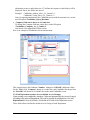
located on the application folder. Running the UpdatePlug.exe file, selecting 'Software
Dongle' and clicking on 'Get Unique PC ID' would give the following:
doc version 1.14
Page 2