1
Windows Network Installation: Model C5400n Only
Ethernet Connection
Note: No Ethernet® cable is supplied with the printer. Use an Ethernet cable with two twisted
wire pairs and an RJ45 plug.
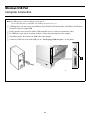
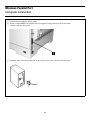
□ Turn off the printer.
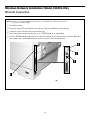
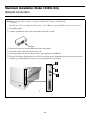
□ Remove the plug (1) from the Ethernet port (2), then connect your Ethernet cable to the port.
□ Connect the other end of the cable to the network port.
□ Turn on the printer and wait for the print server’s STATUS light (3) to stop blinking.
□ Press the TEST button (4) on the print server. The Network Information configuration sheets print. Keep these
sheets handy: they contain information you need to set up the printer on your network.
2