1
This section provides detailed operating instructions for the PS Engineering
PAR100EX, Audio Selector Panel/Intercom/VHF Communication Control
Systems. Please read it carefully before using the equipment so that you can
take full advantage of its capabilities.
This section is divided into sections covering the basic operating areas of the
PAR100EX systems. They are Communications Transceiver Selection, Audio Selector, Intercom, VHF COM, entertainment, telephone, and display.
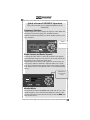
Power and Fail Safe (1)
Unit power is turned on and off by pushing the volume (left) knob. In the
OFF or "EMG" position, the pilot headset is connected directly to Com 1 as
well as unswitched input #1. This allows communication capability regardless of unit condition. Any time power is removed or turned OFF, the audio
selector portion will revert to fail-safe mode.
The power switch controls all audio selector panel functions and the intercom. All pushbutton selections and menu modes (except Bluetooth telephone
association) will be remembered and return to the last state when turned on.
Radio power (as COM 1)
The power supply for the remote communication transceiver is separate from
the audio panel power and control. When the M760 is installed as COM 1, or
as a stand-alone COM, it can be controlled separately in the event of a problem in the audio panel portion, or audio panel power.
If the audio panel is turned off by the left knob (or the audio panel breaker is
opened), the display will indicate “Push radio knob within 6 (countdown)
seconds to keep radio on” If the knob is not pushed, the com radio will also
turn off, but if the data knob is pushed within, the radiofrequency display,
volume and frequency control will remain active.
Communications Transmit (XMT) Selection (2)
The two buttons C1 and C2 (# 2) in the XMT section control which commuPage 2
202-760-0100
PAR100EX
Pilot Guide