1
CONTENT
Introduction
Features
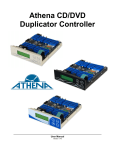
Control Panel
Menu Overview
Operation Guide
1. Copy
2. Test
3. Copy & Verify
4. Copy & Compare
5. Verify
6. Compare Disc
7. Set Burn Speed
8. Select Source
9. Audio Track Edit
10. Utility
10.1 Pre-scan
10.2 Quick Erase
10.3 Full Erase
10.4 Eject All Disc
10.5 Disc Info.
10.6 Drive Info.
10.7 System Info.
10.8 Update BIOS
10.9 Copy Counter
11. Setup
11.1 Auto Start Time
11.2 Display Mode
11.3 Button Beep
11.4 Eject on Start
11.5 Reader Speed
11.6 Language
11.7 Clear Setup
11.8 Advanced Set up
11.8.1 Power on Time
11.8.2 Start-up Menu
11.8.3 Skip Read Error
11.8.4 Change Bad Master Disc
11.8.5 CD Overburn
11.8.6 Copy CD-text
11.8.7 Copy UPC/ISRC
11.8.8 Show HDD Image Name
11.8.9 Boot Password
11.8.10 Set Password
11.8.11 Copy Special Format Disc
12. Trouble Shooting Guide and FAQ’s
Summation Technology, LLC
1155 Kelly Johnson Blvd.
Suite 130
Colorado Springs, Colorado 80920
Toll Free: 1-888-340-3738
Phone: 719-590-6063
Fax: 719-590-6057
Email: info@summationtechnology.com
We Are a U.S. Based Company