1
Set description
Operation
The flashlight has several operational modes:
Maximum — permanently switched light at Maximum mode (activated by click with the head of the flashlight tightened up). It's
an easy and comfortable operational mode for Hunters, especially when the flashlight is used with a remote switch.
5
2
1
3
x2
8
x2
6
Tactical — any mode switched on by half-pressing of the button and active till the button is released. In Maximum mode suitable
for giving signals by short button pressings. In Additional mode quick half-pressings can be used to switch modes.
9
7
4
Additional — permanently switched light at one of the Additional modes at user's choice (activated by click with the head of the
flashlight unscrewed to 1/8). Additional modes: Firefly1, Firefly2, Main1, Main2, Main3, Strobe.
Tighten up
Predator
Maximum
Click x1
1. Tighten the head of the flashlight if it is unscrewed.
OFF
гд
Max
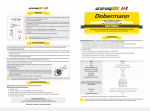
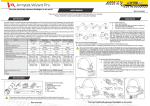
Items included in the package:
1 - Flashlight
6 - Holster
2 - Clip
7 - Spare rubber button
3 - 2 rubber rings
8 - 2 spare O-rings
4 - Rubber grip
9 - User manual
5 - Lanyard
2. First full click of the button turns the light on.
3. Second full click turns it off.
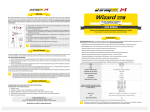
Additional (2 Firefly modes + 3 Main modes + Strobe (if enabled)):
Unscrew to 1/8
Additional
Click x1
OFF
гд
Last
mode
ь Depending on the model, your flashlight can inconsiderably differ from the pictures in the manual.
ь The producer reserves the right to change the package at his own discretion without modifying this manual.
Cycling through Additional modes
Click x2
Strobe *
Initial Service
Firefly2
Main3
Main1
Main2
3.
1. If the head of the flashlight is tightened up, unscrew it for 1/8 of
a circle.
2. First full click of the button turns the light on at the last used
Additional mode.
Cycling through Additional modes:
1. To switch the mode turn the flashlight off and on (either by full
click or half-pressing).
2. The modes switch cyclically: Firefly1 - Firefly2 - Main1 - Main2
- Main3 - Strobe.
Advanced Modes (Firefly1, Strobe):
Firefly1 *
x2
1.
Maximum:
* If enabled
Removing Advanced modes
Additional вTighten up & Unscrew x3
or
Firefly1 and Strobe are advanced modes which you can remove or
add again to the additional modes at your choice. These modes are
enabled by default. To remove (enable) Advanced modes :
1. If the head of the flashlight is tightened up (Maximum),
unscrew and tighten up the head of the flashlight quickly 3 times.
2. If the head of the flashlight is unscrewed (Additional), tighten
up and unscrew the head of the flashlight quickly 3 times.
3. The modes are added to the additional modes’ cycle: Firefly1 Firefly2 - Main1 - Main2 - Main3 - Strobe.
Maximum вUnscrew & Tighten up x3
x3
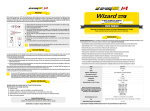
Tactical:
1. For tactical activation use half-pressing of the button (no click!).
2.
Half Press & Hold (no click)
1/2
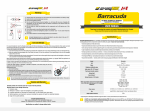
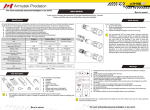
To set/replace batteries:
1. Unscrew the tailcap.
2. Place the batteries with the positive contact (+) facing the head of the flashlight.
3. Adjust the tailcap and tighten it as far as it can go.
ǁ
Release
Tactical
2. To access the Maximum mode the head of the flashlight must
be tightened, to access Additional modes it must be unscrewed to
1/8 of a circle.
3. The light remains on while you half press the button.
We recommend to use Maximum mode for short-time tactical
lighting and giving signals. Frequent half-pressings (<5sec between
them) with the head unscrewed to 1/8 can be used for switching
OFF
ON
Additional modes.
Automemorizing. After switching off the last used Mode is memorized for quick 1-click access at next switching on.
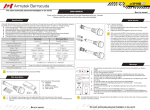
Lock-out function. Unscrew the tailcap to 1/4 for the protection from accidental switching on.
We recommend NOT to leave power sources inside the flashlight for a long storage period, as batteries (especially, non-rechargeable) can leak
for various reasons and damage the inner parts of the flashlight. If you want to keep your flashlight in a stand-by state with batteries in, use new
and quality batteries, store the flashlight in acceptable for batteries operational temperature and revise the batteries' state at least once a
month. If you have noticed any signs of batteries' defects, withdraw them from the flashlight and take out of operation. It is also recommended
to replace discharged batteries with new ones before the storage as the chance of leakage is higher with discharged batteries.
Low Battery Indication. When it is <10%, the LED flashes 2 times ONCE. If you are not sure if it flashed or not switch the
flashlight off and on: in case the battery is low flashes will be repeated. At critical level light output decreases to Firefly mode.