1
Ok, we want our animation to proceed this way:
The first bar begins to grow to its height after about half a second, taking half a second to
grow.
Half a second after the first bar has stopped growing, the second follows, growing to its full
height in half a second…etc. To keep it easy to figure out, all the intervals are 15 frames (half a
second at 30 fps) in duration
3. Press the “f” key to open the Go to Frame dialog box. Enter 15 and hit Enter (or just drag
the Time Slider to frame 15).
4. Select “bar_graph:red bar” as the current item. Hit the Enter key twice (or click the Create
Key button) to set a keyframe at frame 15 to end the static period for the red bar.
TIP: One problem that seems to continually come up from beginners is that they forget that even
a still interval for an animated item must be bracketed on either end by a keyframe. If there
is a motion, there is a keyframe at the beginning position and another at the end of the
motion. It works the same with stillness. The keyframes are what holds the object down to a
position in time. If you get into a situation where an object begins to change too early or
continues to change after it is supposed to, chances are you’ve forgotten a keyframe on
one end or another of the interval.
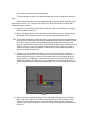
5. Using the one of the methods from Step 3, go to frame 30 on the Timeline. Select the
Stretch tool (h). Stretch the Y-Axis 6.5 meters. You may do this either by: entering 6.5 in
the Numeric field next to the Y-Axis line in the Numeric info box at the bottom left of the
Layout interface, or dragging the Y-Axis handle (the green one) while the Stretch tool is
enabled till the display in the Numeric Info box reads about 6.5. Hit the Enter key twice to
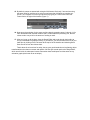
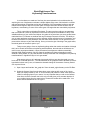
create a keyframe for the red bar in its stretched state. Your screen should look like Figure
2.
Figure 2
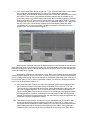
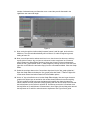
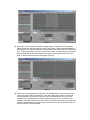
6. Click on the Frame Slider at the bottom of the view window and drag it from 0 to 30 and
back a few times to get an idea what the animated growth of the bar will look like. Drag
between 0 and 15 particularly slowly. Notice that the bar seems to shrink a bit before it
begins its growth spurt on frame 15. Let’s take a look at what causes this and what we can
do to fix it.