1
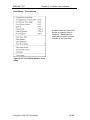
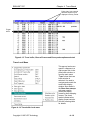
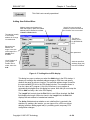
Introducing EMUL68-PC Windows EMUL68™-PC To make a breakpoint inactive: 1. Click once on the line number in the Source window or an address in the Program window -or2. Click on the desired breakpoint in any Program or Source window, then press F2, -or3. Select Setup .. from the Breakpoints menu, click on the breakpoint, click on the Toggle button, -or4. Highlight (click once on) the breakpoint and select Toggle Breakpoint from the Program or Breakpoints menus. To delete a breakpoint: 1. From the Breakpoints menu Select Setup .., click on the breakpoint, click on the Delete button, -or2. Select Delete All from the Breakpoints menu. To use the in-line assembler to add program statements: 1. Scroll a Program window until it shows the address to be changed or press <Ctrl>A and type in the desired address. 2. Highlight the instruction to be changed with the cursor or arrow keys. 3. Type the desired mnemonic and operands (this will open an Enter new instruction: dialog box) and press <Enter>. To change a RAM value: 1. Scroll a Data window until it shows the data to be changed, then highlight the data to be changed with the cursor or arrow keys -or2. Select the Data window, then press <Ctrl>A, then enter the hex address or symbol name in the dialog box. C variable and function names may be entered directly, assembly language symbols must be preceded by an ampersand (‘&’). 3. Type the desired value (this will open an Enter data dialog box) and hit <Enter>. Warning: Always turn on the PC before applying power to the target. Always turn off the target power before turning off the PC power. Copyright © 1997 ICE Technology • 1–6