1
Technical Specification
Bluetooth® Version: Bluetooth 3.0
Operating Frequency: 2402 - 2480 MHz
Lithium Ion Battery: 6000mAh
USB Input: 5V 500 - 1000mA
DC Output: 5V 1000mA
Power consumption during standby/off: < 0.5 W
Power consumption during networked standby for each network port (Bluetooth, USB): < 2.0 W
Power consumption during networked standby when all network ports are activated: < 2.0 W
When the device is powered on and connected to mains with no audio playback and not
performing other main functions,
- it enters into networked standby mode within 20 minutes
- it consumes <0.5 W after all network ports are deactivated/disconnected in 28 hours
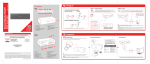
Overview
Top
Rear
1
2
3
4
6
7
18
8
15
22
20
How to activate and deactivate wireless ports / connections
- To activate, perform pairing (See Page 6)
- To deactivate, perform clear device list* on the speaker and press the multifunction button
* 1 Ensure your speaker is not connected to any Bluetooth device.
2 With your speaker powered on, Press and hold the Multifunction button until the white LED blinks rapidly. Press
and hold the Multifunction button and Volume “-“ button until a voice prompt is heard indicating the speaker has
been master reset and returned to pairing mode.
Power Adapter Information
Brand: Creative
Model Number: GPE024W-150160-Z
Input: 100-240VAC 50/60Hz 0.75A
Output: 15VDC 1.6A
Operating Temperature range: 0ºC to 45ºC
Supported Bluetooth profiles*:
A2DP (Wireless Stereo Bluetooth), AVRCP (Bluetooth Remote Control),
HFP (Handsfree profile)
Supported Codec: SBC, aptX, AAC
Operating Range: Up to 10 meters, measured in open space.
Walls and structures may affect range of device.
Supports microSD cards of Class 4 and above, up to 32GB in FAT16/32 format
Supported audio formats: MP3, WMA and WAV (16 bit 48Khz PCM)
Support Mp3 and WMA up to 320kbps. Does not support WMA Pro / Lossless.
Records audio, voice or mobile calls at 16k, ADPCM WAV format.
Note: Compliance markings are located on the bottom of this product.
* Refer to your Bluetooth device (notebook¹, PC¹, or mobile device²) manufacturer’s
documentation/website for supported profiles.
¹ Compatible with PC (Windows XP/Vista/7/8/8.1), Apple Macintoshes equipped with
Bluetooth wireless stereo.
² Compatible with most major brands of Bluetooth A2DP enabled mobile phones.
Compatibility Disclaimer
Wireless performance is dependent on your device’s Bluetooth wireless technology. Refer to your
device manufacturer’s manual.
Creative will not be liable for any lost of data or leakages resulting from the use of these devices.
Product Registration
Registering your product ensures you receive the most appropriate service and product support
available. You can register your product during installation or at
http://www.creative.com/register.
Please note that your warranty rights are not dependent on registration.
Safe Removal of Built-in Battery
Detailed instructions on removal of integrated battery can be found at creative.com/support/
ROAR2, these instructions are meant strictly for independently qualified professionals.
1
5
10
9
12
11
14
13
1. Power ON / Standby Button
12. Micro USB Connector
2. Volume Up / Down Button
13. MicroSD Slot
3. Multifunction Button
- For Bluetooth® pairing / connecting
- Answering calls
17
16
21
19
14. Mic On / Mute Switch
15. Record Button
16. (Record) Play / Pause Button
4. Power / Bluetooth Status Indicator
17. Random / Repeat All Switch
5. Microphone
18. Previous Button
6. Record Indicator
19. Next Button
7. Battery Indicator
20. (MP3 Playback) Play / Pause Button
8. NFC Receptor
9. DC Input
10. Aux-In
21.
/ TeraBass indicator
22.
/ TeraBass button
23. USB Audio / Mass Storage mode switch
11. DC Out (USB 1.0A)
How do I disable Voice Prompt?
● With the speaker powered ON, press both Volume “–“ and Multifunction Button at the
same time. A prompt is heard indicating voice prompt is disabled.
How do I enable Voice Prompt?
● On a speaker with disabled voice prompt, ensure that it is powered ON. Press both
Volume “+“ and Multifunction Button at the same time. A prompt is heard indicating
voice prompt is enabled.
2
23