1
OrgModel Component Properties
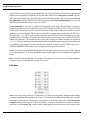
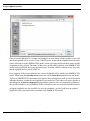
information about the organizational entity represented by the Org Node, affect how it is displayed
in the graphical OrgModel, and to create Resources it owns (which can be available once the OrgModel
has been assigned to a SIMPROCESS model).
Description
This field must be designated as Text (the default), File, or URL. When File is selected, a Browse button
is enabled that allows navigation to any file available in the file system, after which its complete path
will be placed into the Description field. When the field is designated as File or URL, its contents are
not validated and are therefore not guaranteed to be an actual file path or valid URL.
Role
This is a text field into which any meaningful information may be entered to describe this Org Node's
role in the organization being modeled.
Display Settings
Org Node border and fill colors are selected here. The default border color is black, meaning that the
Org Node will be outlined in black. The default fill color is white, so that no color will be used for
the Org Node. The available colors are listed in the SIMPROCESS Color Table, which can be found
in Appendix F of the SIMPROCESS User’s Manual (SIMPROCESS Color Table).
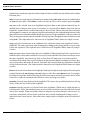
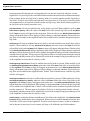
Resources
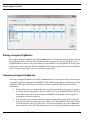
This tab is based on the dialog used in SIMPROCESS to define and edit Resources in a SIMPROCESS
model. (See “Resource Modeling Constructs” for a full discussion of SIMPROCESS Resources.) Not
all of the properties seen on a Resource in SIMPROCESS are present in an Org Node, as they are only
meaningful in a simulation context. As a result, items such as statistics collection and downtimes will
be available once a Resource is assigned for use within a SIMPROCESS model. The properties which
are visible in the table can be edited there directly; in addition, all properties of a Resource can be edited
in a separate Resource Properties dialog. The Name of a Resource must be unique among all Resources
in the OrgModel. Numeric fields which support statistical distributions will support only the standard
set of predefined distributions available in SIMPROCESS.
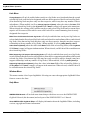
Text Node Properties
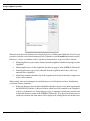
A Text Node exists solely to provide useful information on the graphical OrgModel. Its text content
can be essentially anything. The Edit Text Node Properties dialog allows you to enter text of any length;
it also allows you to specify the font name and size, along with indicating whether to use bold or italics.
In addition, the alignment of the text (Left, Center, or Right) is specified. One thing that cannot be set
via this dialog, however, is the actual location of the Text Node and control over its boundaries. For
SIMPROCESS OrgModel Manual
19