1
Table of Contents
1.
Installation ...................................................................4
1.1
1.2
Installation Process .....................................................4
LED Status Definitions ............................................... 12
2.
Settings ..................................................................... 13
2.1 Camera Setup ........................................................... 14
2.1.1
2.1.2
2.1.3
2.1.4
2.1.5
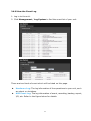
Add Cameras by Camera Search........................ 14
Add Cameras Manually ..................................... 15
Modify Camera Information .............................. 17
Modify Camera Parameters ............................... 17
Set up Lens Settings ........................................ 17
2.1.6
Set up 2nd Stream .......................................... 18
2.1.7
View Camera Status ........................................ 19
2.2 Recording & Event Setup ............................................ 21
2.2.1
Recording Mode Setup ..................................... 21
2.2.2
Recording Schedule / Event Setup ..................... 21
2.2.3
2.2.4
2.2.5
2.2.6
2.2.7
2.3 RAID
2.3.1
2.3.2
2.3.3
Camera Events and Responding Actions Setup .... 25
I/O Box Input and Responding Action Setup........ 27
System Events and Responding Actions Setup ..... 28
SMTP Server Setup .......................................... 29
Add Event Contacts ......................................... 30
& File Settings .................................................. 31
Create a RAID Volume ..................................... 31
View RAID Volume Status ................................. 33
View Disk Drive Information ............................. 33
2.3.4
Modify RAID Volume ........................................ 34
2.3.5
Delete a RAID Volume ...................................... 36
2.3.6
Format ........................................................... 37
2.4 Auto Backup ............................................................. 38
2.4.1
Set up Backup Schedule ................................... 38
2.4.2
Set up Backup Server ...................................... 39
2.5 Network Setup .......................................................... 40
2.5.1
View Network Status ........................................ 40
2.5.2
Network Settings ............................................. 41
2.5.3
2.5.4
2.5.5
Auto Port-Forwarding ....................................... 42
Network Service Setup ..................................... 43
Master/Slave Configuration ............................... 44
1