1
Product Structure (With picture)
Standard Accessories;
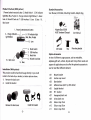
1. Power buttor/ execute button 2. Mode Switch 3. DV indicator
light(Red, Blue, Purple) 4. Charge indicator light(Yellow) 5. Reset
hole 6. MicroSD Card slot 7. USB interface 8. Lens 9. Base 10.
Back cover
User Manual. UsB Cable,
1.
Power button/execute button
I
4, Chargeindicator-\ | 71, DVindiGtorlight.
light(Yellow) ..*Y*r
(Red, Blue, purpte)
-_
'lO.
Back cover
2,
7,
5.
6.
Mode Switch
USB interface
Reset hole
MicroSD Card slot
L
lnstallation (With picture)
This product could be hand-held usage directly or you could
install in the back-clip or bracket, as below pictures show;
21
the back cover
lnstall the bracket
Remove
Mounting bracket, Adaptor Bag
{r,a_
Adapto(EurdUVUl(
;)r
AUsT standared charger)
-*
USB
Cable
Baq
otr ffi*q
Install the bracket
Mounting brackel
Option Accessories
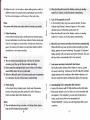
ln view of differernt usaqe purpose. such as motorbike.
airplanes,golf carts, vehicle. bicycles and many others round and
square rail applications,we also offer the optional accessories to
user to meet their different demand.
>01 Mount bracket
>O2 Suction cup mount
>03 Base bracket
>04 Adhesive base (with pc 3M sticker)
>05 Upright bracket
>06 90' bracket
>O7 Hexagonal plastic nut
>08 Anise plastic nut
>09 Silicon strap 5cm
>10 Silicon strap 35cm
>1 1
Silicon strap 70cm
1
Rmove the back cover
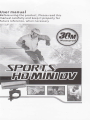
User N4anual
1
-3-