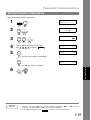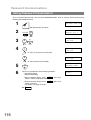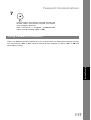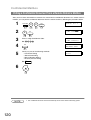
1
+
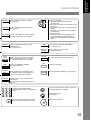
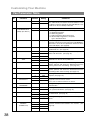
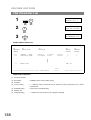
CONTRAST
Used to set Normal, Lighter, or Darker.
(See page 42)
VOLUME
RESOLUTION
Used to set Standard, Fine, Super-Fine.
(See page 42)
HALFTONE
Provides OFF, QUALITY or FAST settings
for halftone documents. (See page 43)
MEMORY
Used to select either memory or direct
communication.
(See page 45 to 51)
-
STAMP
DIRECTRY
SEARCH
PAUSE
Used to enter a pause when recording or
dialing a telephone number, or to redial
the last dialed number. (See page 60)
REDIAL
Used to start Abbreviated Dialing.
(See page 49 and 53)
ABBR
SUB-ADDR
Used to separate the Sub-address from
the telephone number when dialing, or to
access some features of your PBX.
FLASH
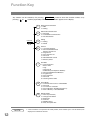
FUNCTION
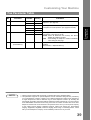
ABC
CLEAR
SET
MONITOR
Used for the following:
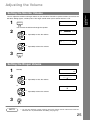
• Adjust the monitor and ringer volume.
(See page 25)
• Move the cursor while entering numbers and
characters.
• Search the station name for Directory Search
Dialing.
• Confirm the entered station for multi-station
communication.
• Select functions.
• Confirm the current communication modes
(e.g. Page number, ID, Dialed Telephone
number, File number) when the unit is ON
LINE.
Used to turn the verification stamp ON or
OFF. (See page 43)
Used to search for a station name.
(See page 50 and 54)
Used to erase the previously entered input.
Used to set operations.
Used to start On-Hook Dialing. (See page 56)
Used to start or select the function and
sub-functions.
These functions are explained in detail on
page 12.
DEF
1
2
3
GHI
JKL
MNO
4
5
6
PRS
TUV
WXY
7
8
9
TONE
OPER
Used for manual number dialing,
recording phone numbers, and numerical
entries.
STOP
Used to cancel operations. When it is pressed,
the machine will return to standby.
COPY
Used to make copies.
(See page 65)
0
TONE
Used to start operations.
Used to temporarily change the Dialing
Mode to Tone when Pulse mode is set.
START
15
Getting to Know
Your Machine
Control Panel