1
vv
arts|UNMUTED switcheroo
USER GUIDE
4. PAD BEHAVIOR SELECTOR
This button will let you define pad behavior (pad or switch).
5. MULTI OUTPUT SELECTOR
This button switches multi-output mode on/off and shows
output elements.
MULTI-OUTPUT BAR
with controllers for each MIDI
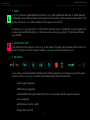
6. MULTI OUTPUT BAR
The bar consist of 4 pairs of switches. The gray switches with values are for selecting consecutive output
elements. The values show the currently selected output values for each output element. The dark gray
buttons activate respective output elements. Each output element can be defined as note or CC with MIDI
OUTPUT TYPE SELECTOR.
-12-