1
Getting started
Organizing home screen icons using folders
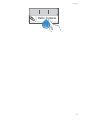
1. On the home screen, drag an application onto another one to create a
folder containing both of them.
2. Touch the folder to open it. You can then:
• Touch the folder name to rename it.
• Touch
and add more items to the folder.
• Drag an icon out from the folder to remove the icon.
A folder must contain at least two items; otherwise, the folder will
automatically disappear.
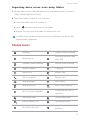
Status icons
R
Roaming
Bluetooth on
Airplane mode enabled
Receiving location data
from GPS
Vibration mode enabled
Silence mode enabled
Alarms enabled
Charging
Battery full
Battery low
Call in progress
Missed calls
New messages
New emails
New voicemails
Select input method
Wi-Fi network available
Connected to a Wi-Fi
network
Uploading data
Downloading data
Phone memory full
Upcoming events
No SIM card found
Login or synchronization
problem
9