1
9 - Troubleshooting
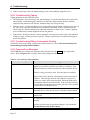
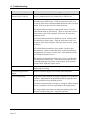
Error Message
Error Ejecting Card
Possible Causes / Suggested Steps
No card was detected at the card output bin during transfer from XY to Exit module, or the card output bin was blocked while a card
was being transferred (e.g., two cards at once). Check to ensure that
a card is not present or stuck in the card path. If the error does not
clear, perform a System Reset. If that does not work, restart the
device.
The card did not eject from the encoder during transport to the
image printer. May be caused by two cards that are stuck together.
Perform a System Reset to remove the card.
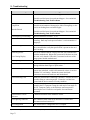
Ejectbin Full
The card output bin is full or the card output sensor is blocked.
Rejectbin Full
The card rejection bin is full or the card rejection sensor is blocked.
Hopper Empty
The currently selected card stock hopper is empty, the weight is not
placed on the top of the stack, or the cards are not fully inserted. If
the cards are loaded completely and correctly and the problem
persists, you may need to restart the device.
Error Reading Card
A card could not be read or timed out during attempt to read.
Possible misorientation with magstripe, debris on magstripe, or the
card is not feeding from card stock hopper.
Get Modelnumber
Could not retrieve the model number of the controller board.
Possible cable disconnection from board to PC.
Get Sensors
Could not retrieve the sensor status from the controller board.
Possible cable disconnection from board to PC.
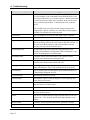
Pending
“Pending” is the status returned when monitoring a transaction. The
status will change to “Busy” after reaching the top of the queue.
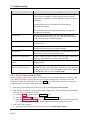
Not Activated
The EC2000 has not been through the initial authorization process.
Contact MagTek Support Services.
Error Initializing
Initialization of the device failed.
Top Door Open
The top door is open. Close the top door. If still reporting, then
check the top door sensor.
Access Door Open
The access door is open. Close the access door. If still reporting,
then check the access door sensor.
Door Status Failed
The door sensor status was not returned from the Controller.
All Bin Full
The card output bin and card rejection bin are full. Empty both bins
or check the bin sensors.
Offline
The device is Offline and will not process cards until it is set to an
Online state. Close all doors and click the Status button to set to
Online.
Job Not Found
Could not find the requested transaction. Queue ID is invalid.
No Job
The transaction was not queued due to an error in the transaction.
ExpressCard 2000| Instant Issuance Card Personalization System | User Installation and Operation Manual
Page 74