1
DHS Systems, LLC
TM 95236-00
0006
System Soft Reset
CAUTION
The AVCS (MINI) maintains all user-entered information in flash memory. Changes to the
Controller page will be saved until a manual System reset has been initialized. Once reset, the
addresses will revert to the default settings. The System Soft Reset will reload the software only,
the manual system reset will restart all components.
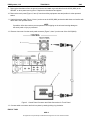
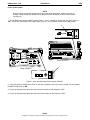
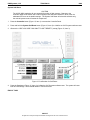
1. Press the Controller button (Figure 15, Item 1) to access the Controller Panel.
2. Press and hold the System Soft Reset button (Figure 15, Item 2) to initialize an AVCS system software reset.
3. Observe the “ARE YOU SURE YOU WANT TO SOFT RESET?” prompt (Figure 15, Item 3).
Figure 15: Confirmation for Soft Reset.
4. Press the Yes button (Figure 15, Item 4) to initiate the AVCS system software reset. The system will reset
itself to initial settings. Select the No button to cancel the reset.
END OF TASK
0006-15
No rights are conveyed except as indicated in the legend on the cover of this document.