1
Manufacturing and processing
program, carried with the validation of trajectory points. In some
cases, an operator can use an application that will export each
point of the trajectory to the CAD program and will present the
path in an intelligible form [3,5]. However this method fails if the
path is created in a dynamic way, based on the result of
conditional statements in the program. In this case, you can try to
examine all the alternative trajectories, but this would require
sophisticated tool for source code analysis and developing the
form of path presentation in the CAD application. Another way of
solving this problem may be the translation of the robot program
to a description similar to the pseudo code, which could be
interpreted in a certain graphical environment. In this case, it was
decided to adapt the Logo language for the presentation of
manipulator’s trajectory. Compared to the other programming
languages, the Logo is a convenient tool for use in the field of
robotics, due to:
x simple syntax, derived from LISP,
x direct support for mapping the path on the computer graphics
device (turtle graphics),
x original application of turtle graphics is an interface for
mobile robot control.
In the next part of this work the concept of a simple system
used to visualize the trajectory of the robot manipulator, using the
Logo interpreter, will be presented.
2.The
overall
description
2. The overall
description
of the of
the
approach
approach
2.1.The history of the Logo
language
2.1. The
history of the Logo language
The first Logo interpreter was created in 1967 at BBN
laboratory, driven by three scientists: Bolt, Beranek and Newman,
located in Cambridge, Massachusetts. The creators were Wally
Feurzeig and Seymour Papert. Two years later, at Massachusetts
Institute of Technology, a turtle robot was created, as a Papert’s
initiative. Original idea of turtle robot was designed under
auspices of Wiliam Grey Walter in the late forties of XX century.
In later years Apple and Texas Instruments began a broad
campaign to promote Logo as a programming language for
beginners, especially useful for kids in primary schools. In this
way, this language has gained a reputation as trivial software for
children. This opinion seemed to be confirmed by the presence of
turtle graphics.
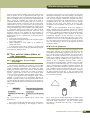
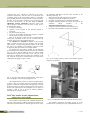
a)
b)
Fig. 1. The example code in standard Logo (a) and its Polish
localization (b)
Logo is derived from LISP and retains all the characteristics
of that language. Programming in this language is based on
procedures, words and lists, so it does not differ too much from
other high-level languages. The main advantage is the simplicity
of the program, while the disadvantages include the fact, that in
most cases Logo language is available as interpreter. This means
that during each procedure call, the program code is every time
re-translated line by line. This affects the speed of program
execution. For this reason, some dialects of the Logo offer
compilation to the intermediate code ("p-code") or a standalone
compiler.
There are also implementations of the Logo language in
which commands have been translated into the user national
language. Examples include Komeniusz/Comenius Logo, ACLogo
and Imagine. Translation of commands into the foreign languages
is a non-standard approach when compared to the other
programming languages. On the one hand, it can help to
understand the code, but on the other, the source code is not as
universal as in the case of other programming language. In the
Fig. 1 the sample program written in Logo is shown. On the left
side is the original Logo code and on the right side the Polish
translation is shown.
2.2.Turtle
graphics
2.2. Turtle graphics
The turtle graphics is a part of the Logo language [11-15].
This graphics subsystem is very different from that used in the
other high-level programming languages. In the classic case, we
have a screen with a specific resolution. The points and lines
defined in the absolute coordinates. The Logo language uses a
virtual screen (sometimes called canvas), whose resolution is not
directly linked with the capabilities of the graphics device. In
addition, it uses a component called the "turtle", which is
characteristic for the turtle graphics. This little icon in the shape
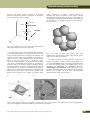
of a triangle or a turtle-like image (Fig. 2), is a kind of cursor,
which is controlled by the appropriate commands. Generally, the
turtle moves in the relative coordinates, where the reference is the
local coordinate system associated with the turtle. It is also
possible to move the turtle, giving the coordinates in relation to
the global coordinate system (Fig. 3). The user decides which
method should be used, but in most programming tasks, the first
one is used more frequently.
a)
b)
c)
Fig. 2. Some types of standard turtle shapes: a) default shape,
which could be found in almost all Logo implementation; b) the
turtle from KTurle application - the part of KDE desktop
environment; c) the turtle from Curly Logo - a web implementation of Logo
READING DIRECT: www.journalamme.org
195