1
1.2.3
Close and restart
Administrator can use poweroff or halt command to close the system, and use reboot aommand to restart
the system
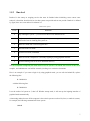
Moreover, it is more agile to use shutdown command: input shutdown command that has no parameter, the
system will be closed after 2 minutes. shutdown command can also add some parameter options:
Such as:
now
+mins
(after appoint minutes)
hh:ss
(between a particular time)
poweroff/halt command liks shutdown –h now。
reboot command liks shutdown –r now。
Do not shut the power under the situation that you have not carry out the natural program
of closing completely. Otherwise,you will see the information that the system report there
has some mistake of disk when you start up system again.
1.3 About user interface
User interface means the communication mode between user and computer. Asianux 2.0 provides two
different kinds of user interface: command line interface base on text mode and graphical desktop
environment. To use which one depends on the operating habit of user and practice require.
1.3.1
Command line interface
Command line interface is a old but powerful user interface in Linux system, the system will start up
the relative shell automatically when user enters Asianux 2.0. shell is a kind of command-language
interpreter, its responsibility is communicate between user and system. Every command that input under
prompt is carried out by Linux kernel after interpret by shell. You can start up、hang up or even compile
program thought shell. There are many kinds of shell, the defaulted shell of Asianux 2.0 is bash. Bash is the
abbreviation of Bourne Again Shell, under bash, root account user “#” as prompt and general user use “$” as
prompt.
1.3.2
z
Graphical desktop environgment
What is X Window system
X Window is a standard GUI in Linux, it contains two parts: one is X Window server which is used to
3