1
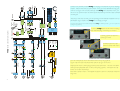
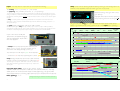
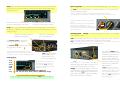
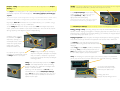
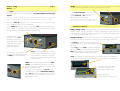
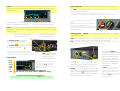
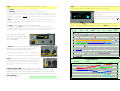
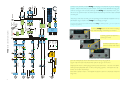
USB Line Out Ext. I/O PAD 40dB 0/+20 dB Meter int/det Ch 1..3 RTN To set up MIXY press the Esc button briefly – the meter display will change to a menu. USB IN3 IN1 IN2 BUS L/C/R Routing OUT USB R Monitor Source Select USB Interface L/C/R Routing USB L Tone D A Monitor Mode Select OUT R OUT L A M/S dec D Digital Audio Rx Toslink I/F Digital Audio Tx SYNC IN1 IN2 IN3 Optical Out It’s quite OK to peek at menus and settings while MIXY is handling audio – you won’t affect the sound just by looking. GGpGzG G pGXGMGYGtG G h Gp/ Use the joystick to select the option you want, R Monitoring point Slate Ch 3 ϕ Ch 2 ϕ and then press the Left button to enter that menu. On/Off RTN2 RTN1 IN3 IN2 IN1 DC You can navigate up, down and across lists using the joystick. If you meet a >sign there are further options for you to scroll to. 8-18V DC Line In 3 Change the highlighted item or value using the joystick – and press the Left button to confirm the change. Press Esc to leave a menu – and repeat the press to return to the meter screen at any time. P12 P48 T12 Off Rx1 Ext. I/O Rx2 P12 P48 T12 Off PAD 20dB Charger Highlight an item to change by pressing the Left button – the item will flash. 2 1 GGGGGGGGGGGGGGGG pG zG QGpGXGMGYGtG GG h Gp/ GG pGzG QGpGXGMGYGtG GG h Gp/ 15 / 120 / 300 Hz 0..50dB (10 dB steps) HPF P12 P48 T12 Off 2 channel audio signal Differential signal L/R/C L/R/C L/R/C L/R/C Balance / S width Coupling (Stereo/MS) ϕ Invert Ch 1 M/S dec L/R/C Route L OVLD Mic power 10 There are 9 memories so that you can quickly switch between different sets of parameters if you need to use MIXY in a variety of ways. BUS Lim MIXY block schematic diagram Direct & Dig.Out SPDIF In PAD 40dB Tx2 Tx1 Unlike most portable mixers MIXY is largely controlled through her display screens. Take a little time to explore them. Once you have decided the way you want to work you can store the settings and MIXY will remember them. You can turn her off and when she starts again the settings will have been retained unchanged. 3