1
Chapter 5 Operations
EM9 User’s manual
password, and after exiting function code edit mode, it will become effective after 1 minute. If pressing the
PRG/ESC again to try to access the function code edit mode, “0.0.0.0.0”will be displayed, and the operator must
input correct user’s password, otherwise will be unable to access it.
If it is necessary to cancel the password protection function, just set F7.03 to be zero.
5.3 Running State
5.3.1 Power-on initialization
Firstly the system initializes during the inverter power-on, and LED displays “8.8.8.8.8.”. After the initialization is
completed, the inverter is on stand-by status.
5.3.2 Stand-by
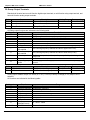
During stop or running modes, parameters of multi-modes can be displayed. Whether or not to display this
parameter can be chosen through function code F7.04 (Running status display selection) and F7.05 (Stop status
display selection) according to binary bits, the detailed description of each bit please refer the function code
description of F7.04 and F7.05.
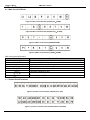
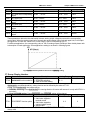
During stop modes, there are 9 parameters which can be chosen to display or not, which are reference frequency,
DC bus voltage, ON-OFF input status, open collector output mode, PID setting, PID feedback, analog input AI1
voltage, analog input AI2 voltage, step number of multi-step speed. Whether or not to display can be decided by
setting the corresponding binary bit of F7.05. Press the 》/SHIFT to scroll through the parameters in right order .
Press DATA/ENT + QUICK/JOG to scroll through the parameters in left order.
5.3.3 Motor parameter auto-tuning
For details, please refer to the description of F0.13.
5.3.4 Operation
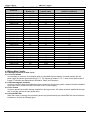
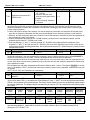
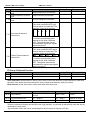
During running modes, there are 14 running parameters: output frequency, reference frequency, DC bus voltage,
output voltage, output current, output power, output torque, PID setting, PID feedback, ON-OFF input status,
open collector output status, length value, count value, step number of PLC and multi-step speed, voltage of AI1,
voltage of AI2 and step number of multi-step speeds. Whether or not to display can be decided by the bit option of
function code F7.04 (converted into binary system). Press the 》/SHIFT to scroll through the parameters in right
order . Press QUICK/JOG to scroll through the parameters in left order.
5.3.5 Fault
EM9 series inverter offers a variety of fault information. For details, see inverter faults and their troubleshooting.
5.4 Quick Testing
17