1
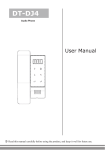
1. Parts and Functions
97.1
33.2
7 segment LED
187
150
8888
Handset
2
1
Up button
Menu button
Down button
Cancel button
Unlock 2nd button
Unlock button
Speaker
Handset line
Side View
Key functions
7 segment LED
Display setting informations
Handset
Pick up to communicate with visitor
Hand line
Connect handset with monitor
Unlock button
Press to release the door
Unlock 2nd button Press to release the second door
Up button
Press to move up or increase the value
Down button
Press to move down or decrease the value
Menu button
Press and hold for 2s to open the setting menu shortcuts.
Cancel button
Press to cancel the operations
Speaker
Send out vioce from the visitor