1
TABLE OF CONTENTS
PREFACE
Symbols and Conventions
Protecting Your Computer - Avoid Abusive Handling and Adverse
Environment
Chapter Summaries
1.
GETTING TO KNOW THE BASICS
Performance Features (1-2,3)
System at a Glance (1-4)
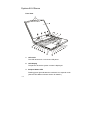
Top View (1-4,5,6,7,8)
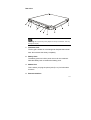
Rear View (1-9,10)
Bottom View (1-11,12)
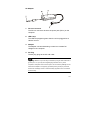
AC Adapter (1-13)
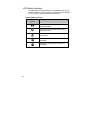
LED Status Indicators (1-14,15)
Keyboard Features (1-16,17)
Function (Quick) Keys (1-16)
Windows Keys (1-17)
Embedded Numeric Keypad (1-17)
Touch Pad with Page Up / Page Down Function (1-18)
Graphic Subsystem (1-19)
Adjusting the Display Brightness (1-19)
Extending the Life of the TFT Display Panel (1-19)
Opening and Closing the Display Panel (1-20)
Audio Subsystem (1-21)
Adjusting the Volume Manually (1-21)
Adjusting the Volume in Windows (1-21)
Adjusting the Audio Volume via the Volume Dial (1-21)
Voice Recording (1-21)
Modem and Modem Setting (1-22)
Ethernet Adapter (1-23)
2.
BIOS SETUP AND SECURITY
Entering the BIOS Setup Screen (2-3)
Leaving the BIOS Setup Screen (2-3)
i -2