1
BINARY ENCODING AND BIT
DETECTION OF KEYBOARD
CHARACTERS
A clever way to scan the
keyboard quickly
and
generate
Morse Code.
By: Michael J. Goldstein
Courtesty of TOSIE
Toronto Ohio Scientific Idea
Exchange .
P. O. Box 29
Streetsville, Onto
Canada L5M 2B7
Having done the nCl Tape Control n modification (Put Your
Tape Cassette Under Software
Control), I now had a softw'are
controlled relay available for
Morse Code transmission.
.
The easiest way to have software open and close a relay
for Morse code is to use a"
separate subroutine for each
keyboard character, with timing loops for opening
and
closing the relay for the desired code character.
This
works, but is very memory hungry, and slow.
Don Moore, VE3EVE, suggested I
use encoding and bit petection
~ and when I looked blank,
he
borrowed all my OSI manuals;
not only did he devise this
elegant encoding scheme which
I shall shortly reveal, he
also discovered how to use the
. machine code keyboard
scan
routine at $FD00:
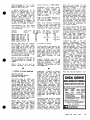
11.0 POKE 11,0: POKE 12,253:
Z=PEEK(53l): REM SETS USR
POINTERS
.
120 X = USR(X): PRINTCHR$(Z);'
:REM KEYBOARD SCAN
130 GOTO 120: REM GO GET THE
NEXT KEYBOARD P~ESS
Tpis gives you a fast keyboard
detection scheme. If you try
to scan the whole keyboard
using BASIC, and the method
shown in the
OSI
Graphic
Manual, you will have to wait
with your finger on the key
till the keyboard scan routine
Copyright. 1985 PEEK (65) Inc. All Rights Reserved.
published monthly
Editor· Eddie Gieske
Technical Editor· Brian Harston
Circulation & Advertising Mgr .• Karin '0. Gieske
~~~s~~l~t~o~e~~ie~ A.
Fusselbaugh, Ginny
US
Canada & Mexico (1st class)
So. & Cen. America .
Europe
Other Foreign
Ma~r
Surtace
$19
$26
$38
$30
$38
$30
$43
$30
All subscriptions are for 1 year and are payable in advan~e in·
US Dollars.
For back issues. subscriptions. change of address or other
information. write to:
PEEK (65)
P.O. Box 347
Owings Mills, MO 21117 (301) 363·3268
Mention 01 products by trade name in editOrial malerial Of
advertisements contained herein in no way constitutes endorsel'Wnts 01 the product or products by this magazine or
the pullksher.
2
PEEK [65]
May, 1965
gets 'round to scanning that
key - very awkward typing!
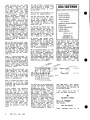
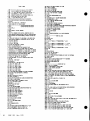
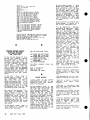
10 DIM C(50)
20 FOR Z =1 T050: READ C(Z):
NEXT:RESTORE
Once you have the keyboard
character, you are ready. to
convert it to Morse Code.
30 •••••••
1000DATA ••••••
l0l0DATA-•• " ••
1020DATA•••
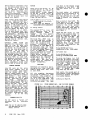
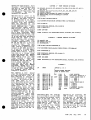
This is how Don encoded each
character, first in Binary,
then in Decimal:
'First, we will use 0 for
nditn, and 1 for a ndahn •••
Now, we must detect the Number
of bits in each character and
send the dit or dah for each
bit •••
a
•
For the letters A, B, and C •••
.28
~
A= ' -
0
1
B= - •• :. =
1
0
0
0
C= -.-. =
1
0
1
0
27
26
25
24
8
4
23
22
LIi
-.J;
We 'also need· to know how many
bi.ts each character has, after
It is binary-encoded.
Three
binary digits allow you to
count up to 7 in Decimal. The
longest Morse character has 8
bits - the "error n sign is
•••••••
Later we will see
that using only 3 binary digits for bit counting allows us
to easily divide the decimal
equivalent of our binary encoded character by 256.
So,
we will use
extra
binary
digits to count the number of
character bits MINUS ONE.
DECIMAL
20
21
BINARY
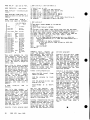
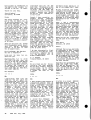
199 Z =Z-43: REM CONVERTS Z
FROM ASCII VALUE TO ARRAY
COUNTER
290 H=256: N= INT(C(Z)/H) :REM
NUMBER OF BINARY BITS(-l)
IN CHARACTER
210 I+128:FOR Ll=0TON:Il=INT
(B/I):REM IS FIRST BIT A 1
OR A 0?
220 B=B-I*Il:REM VALUE OF B
UPDATES TO CHECK NEXT BIT
230 IF Il THEN 6000: REM -IF
II (FIRST BIT) IS A 1, GO
TO "SEND A DAH" SUBROUTINE.
1
1024
512
A(·-)
256
128
64
1
0
1
32
16
0
B(- ... )
1
1
1
0
0
C(-·-·)
1
1
1
0
1
21
20
27
26
22
BIT C01JNTING
2
4
2
1
DEC.
23
22
21
20
BIN.
0
5
24
•
ENCODING
If the char'acter has four bits
(1000) the bit count shows 3
(011). Our data word now consists of up to 11
binary
digits: the first 3 (from the
left) signify how many actual
bits(-l) our encoded character
contains. The remaining bits
encode our character.
Weil, we can't use binary digits easily in BASIC, so let's
now. convert our unique binary
codes to equivalent decimal
numbers.
That's easy - just add up
decimal values of all
binary digits we used!
8
the
the
A 256 + 64 = 320
B = 512 + 256 + 128 = 896
C = 512 +·256 + 128 + 32 = 928
All of these decimal' val ues
would be read into an array,
to be used later in sending
code. The decimal values are
stored in DATA statements.
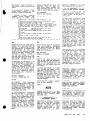
240 GOTO 7900: REM FIRST BIT
AIN'T A 1, SO IT MUST BE
A 0-S0 GO TO THE "SEND A
DIT n SUBROUTINE
250 1=1/2: NEXTLl: REM YOU'VE
CHECKED THE FIRST BIT- GO
CHECK THE NEXT.
260 REM WAIT A SPELL AFTER
YOU'VE SENT THE LAST DIT
OR DAH, AND GO BACK TO THE
KEYBOARD SCAN ·FOR A NEW
CHARACTER ••• USE TIMING
LOOPS FOR DELAYS
270 GOTO 120
Oh Yeah •••• TOSIE's beginners
articles by Roger say
you
should initialize all those
variables before starting into
your loops, to keep things
running speedily, and to avoid
having to initialize each variable each time you go through
the loops.
6000 REM DAH SUBROUTINE
6010 CLOSE THE RELAY, WAIT A
WHILE, OPEN THE RELAY,
WAIT A SPELL, AND BACK
TO THE PROGRAM
•