1
3
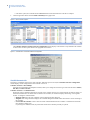
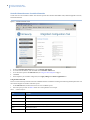
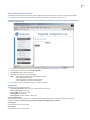
Controller Preference - Networking:
(This option not supported for the PXNplus controller.) displays only if the system identified your controller as a network
controller and allows you to change the network preferences for the controller.
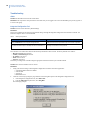
1. Make the changes needed and click OK. A dialog box displays asking you to verify your request.
2. Click OK to re-configure the controller. The controller resets after the configuration changes have been made.
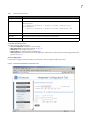
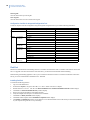
Start Flashing Controller(s)
This option starts flashing the selected controller(s) with the latest firmware. A dialog box displays, asking you to verify your
request. The flashing process takes approximately two to three minutes; it varies with the amount of data that needs to be
transmitted to the controller.
1.
2.
Click Start Flashing Controller(s) to immediately download the appropriate firmware to the controller. A dialog box displays
asking you to verify your request.
Click OK to begin the flash and reset process. After a successful flash, the controller resets and a database download takes place.
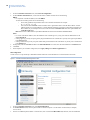
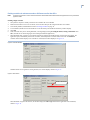
View/Edit Flash Files
Use this option ONLY when it is necessary to selectively flash an older version of firmware on a controller. This application
automatically selects the latest version by default. The flashing process takes approximately two to three minutes; it varies with the
amount of data that needs to be transmitted to the controller.
1.
2.
Select the firmware file by using
• the drop-down list
• the Browse button to navigate another media source or directory where the firmware files reside.
Click OK to begin the flash and reset process. After a successful flash, the controller resets and a database download takes place.
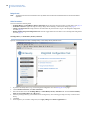
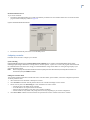
Integrated Configuration Tool
The Integrated Configuration Tool is a browser-based utility used to configure the PXNplus CPU board, update the firmware, and view
the application log file.
Requirements
Software requirements
One of the following:
• Microsoft Internet Explorer 6.0 or later
• Netscape 7.0 or later
• Mozilla 5.0 or later
Hardware requirements
• Cat5 crossover cable for direct connection to a controller
• Cat 5 standard cable with network hub