1
Operating instructions tape deck
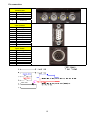
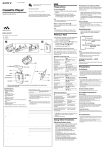
Inserting a Cassette
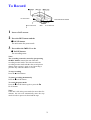
1 Press and hold down the small button and
Notes
When disconnecting the unit from the power
source, make sure the cassette compartment door
is closed. Otherwise, you may not be able to
close it afterward. If this happens, re-connect the
power source.
When inserting a cassette, make sure that the
side with which the tape is visible inside is
facing upward. If you inset the cassette upside
down, you may not be able to take the cassette
out.
slide the HOLD/PUSH OPEN-switch to the
OPEN position.
HOLD/PUSH OPEN-switch
While pressing
2
3
To eject the cassette
While the unit is in the stop mode, press and
hold down the small button and slide the
HOLD/PUSH OPEN-switch to the OPEN
position.
Open the cassette compartment door.
Insert a cassette with the window facing
upward.
HOLD/PUSH OPEN
While pressing
Record-protect shutter
Slide the record-protect shutter to the left to
protect a recorded tape from being accidentally
erased by recording on the tape for the second
time.
4
Close the cassette compartment door.
If the shutter is open, you cannot record on the
tape
The cassette will be loaded automatically.
If the shutter is closed, you can record on the
tape
2