1
Table of contents
Important safety information.............................................................................. 4
Precautions...................................................................................................... 4
Declaration of conformity............................................................................ 6
WEEE........................................................................................................ 6
Getting to know your Navman............................................................................. 7
Mounting your Navman in a vehicle.................................................................... 8
Turning your Navman ON and OFF...................................................................... 9
Resetting your Navman................................................................................. 9
Inserting a memory card...................................................................................... 10
Navigating on the screen......................................................................................11
Main Menu............................................................................................................. 12
Using the Keyboard screen.................................................................................. 14
How do I go from A-B?......................................................................................... 15
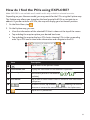
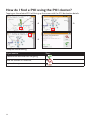
How do I use the FIND wizard?.................................................................. 15
How do I plan my first trip?........................................................................ 16
How do I preview the destination on map?...............................................17
How do I preview a route?.......................................................................... 18
Changing the navigation mode.................................................................. 18
Large Vehicle and Professional Truck modes................................... 18
Pedestrian mode.................................................................................. 19
How do I view my route?.....................................................................................20
How do I select the route type?.................................................................20
The driving map............................................................................................20
How do I change the route configuration?....................................... 21
How do I view my route statistics?...........................................................22
How do I adjust the volume?......................................................................22
How do I zoom in/out the map?.................................................................23
Advanced routing functions........................................................................23
Smart Routes........................................................................................23
My Drive................................................................................................23
Parking assistant..................................................................................24
How do I create a trip with multiple stops?..................................................... 25
How do I edit the waypoints in the trip?...................................................26
How do I skip a waypoint during a multi-stop trip?................................26
How do I capture a location or a journey?........................................................ 27
How do I capture the GPS co-ordinates of my location?....................... 27
1