1
CONTENTS
Product Introduction
Features and Parts
Installation
PRODUCT INTRODUCTION
3
4
Thank you for purchasing our products of building intercom system series.Please
read the instructions carefully and follow the directions before install the products.
Any problem regarding to the product,please query your supplier.
5
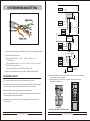
KW-138EA Sketch Map
Installation Range
Installation Attention
System Wiring and Setting
System Wiring Sketch
Guard Room Connection
Distributor Connection Terminal
Configuration of Distributor
Jumper
Video Setup
Floor No. Setting
Connecting and Configure Between Indoor Monitor and Distributor
Wiring Between Outdoor Unit and Distributor
Wiring Between Distributor and Indoor Monitor
The Connection Between Distributor
Operation Guide
Initial Room No. And addressed port No. Setting form for KW-138EA
Administrator menu
Administrator mode -- password setup
Administrator mode -- unit setup
Administrator mode -- RF card management
Administrator mode -- model No.and publishing date of software display
Administrator password initialization
Call and unlock
False Malfunction
Parameters
Words Explanation
5
6
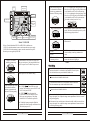
GENERAL FEATURES:
7
Simple wiring, only use one ethernet cable to connect the whole system,
reduce the cost of installation and maintenance.
8
8
10
10
11
11
13
14
15
15
16
17
18
18
18
19
19
21
23
23
23
25
Press the relevant room number to talk with indoor monitor directly.
Indoor unit could monitor the outdoor condition and hear the voice.
Unlock the door by ID card, password, or remote unlock from indoor monitor.
Display the current time and operation status on the outdoor camera
Able to change the unlock password with your need
Max. support 64 units indoor monitor (support totally 16 layers, each layer with 4 users)
Max. support 1000pcs ID card
Light induction, auto switch the external connected lamps according to the outdoor
light intension. (to reach this function, need connect KW-516EA)
Support connecting guard room, use 4 wires connection terminal.
To avoid the risk of electric shock, please don't remove cover or back.
Please ask professional person if maintenance needed.
Remind users that important operation and maintenance guides are
included in the attached user's manual.
26
26
2
* KENWEI reserves the right to change or modify design,features,functions
and specifications without any prior notice for the improvement and promotion
of products quality.
3