1
This handbook is for the use of a manager who is responsible for care alarm system as a whole, rather than setting individual monitors
Overview
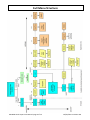
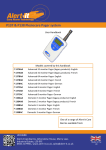
The Alert-it P137/8 Pager is a powerful system monitoring device for radio linked
alarm systems. It can receive status transmissions from up to 64 alarm monitors
(depending on model) and alerts the user should any enter an alarm condition.
The alarms are classified into 4 levels and the alarm display is prioritized in terms
of level and age.
In addition, any monitor can be deemed of high integrity, in which case the user is
alerted if the radio link to that monitor fails. This is achieved by monitoring a
heartbeat signal that is sent approximately every 8 seconds from such monitors.
Lastly, any monitor can be additionally set to detect the transmitter moving
outside a pre-defined geographical area. This is achieved by calibrating the
minimum acceptable radio signal strength from the monitor, and if it falls below
this value then the user is alerted.
For convenience to the user each monitor can be named to suit the application
and each level of alarm plays a different “tune”. The pager can also be used in
discrete mode with a vibrator, as may be preferred for night use.
The P137 pager can send all alarm details to a computer using an optional USB
interface (P146). This link also allows:
Ÿ all the user data to be saved and reloaded from a computer (eg for cloning
replacement pagers) using P172C software
Ÿ triggering additional equipment such as telephone autodiallers or sirens.
Ÿ reading the P137 pager log of both the frequency of alarms from each monitor
and the maximum time to service those alarms, using the P172B logging
software. This provides essential metrics for any manager to demonstrate the
level of response achieved.
Ÿ Real-time logging of alarms using the P172A software
The term NODE appears in the pager display and is reference in this manual. It is
synonymous with monitor, referring to any device that can generate an alarm
Operation
Turn On
Press MENU for 3 seconds and the display should come on and show the
PRODUCT name followed by 4 digits for the software Version/Issue and 4 digits for
a special checksum that allows the manufacturer to offer unique installation codes.
The normal code is 07A6
UH1068A P137 Supervisor Manual page 2 of 13
19/02/2015 11:22:01 AM