1
Recommendation: Run DXDiag.exe to get a report of your system.
1. From your taskbar, Click on Start, and then Run.
2. In the „Open‟ box, type dxdiag.exe and click „OK‟.
3. The DX Diagnostic Tool Dialog Box with open with a detail of your system
configuration.
The main page of this dialog box will tell you the version of Windows you are
running, how much RAM (Memory) you have and what version of DirectX you
have. If your program requires DirectX and you do not have the required
version, you need to install it either by running the product‟s installer again
and selecting yes when prompted to Install DirectX, or go to Microsoft‟s
website and download the latest version.
Video Card:
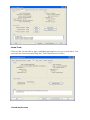
Click on the „Display‟ tab on the top to switch screens to the video. You will
see the following dialog box with the information on your system.
You can test the 3D capabilities by selecting the „Test Direct3D‟ button.